

From Amazon listing to profit, in one subscription

Five tools for EU Amazon sellers who buy wholesale from suppliers and on Qogita. See profit right on the listing, build carts by your own thresholds, and keep your profit and loss in one place.

€100 per month excl. VAT after the trial. Cancel anytime.

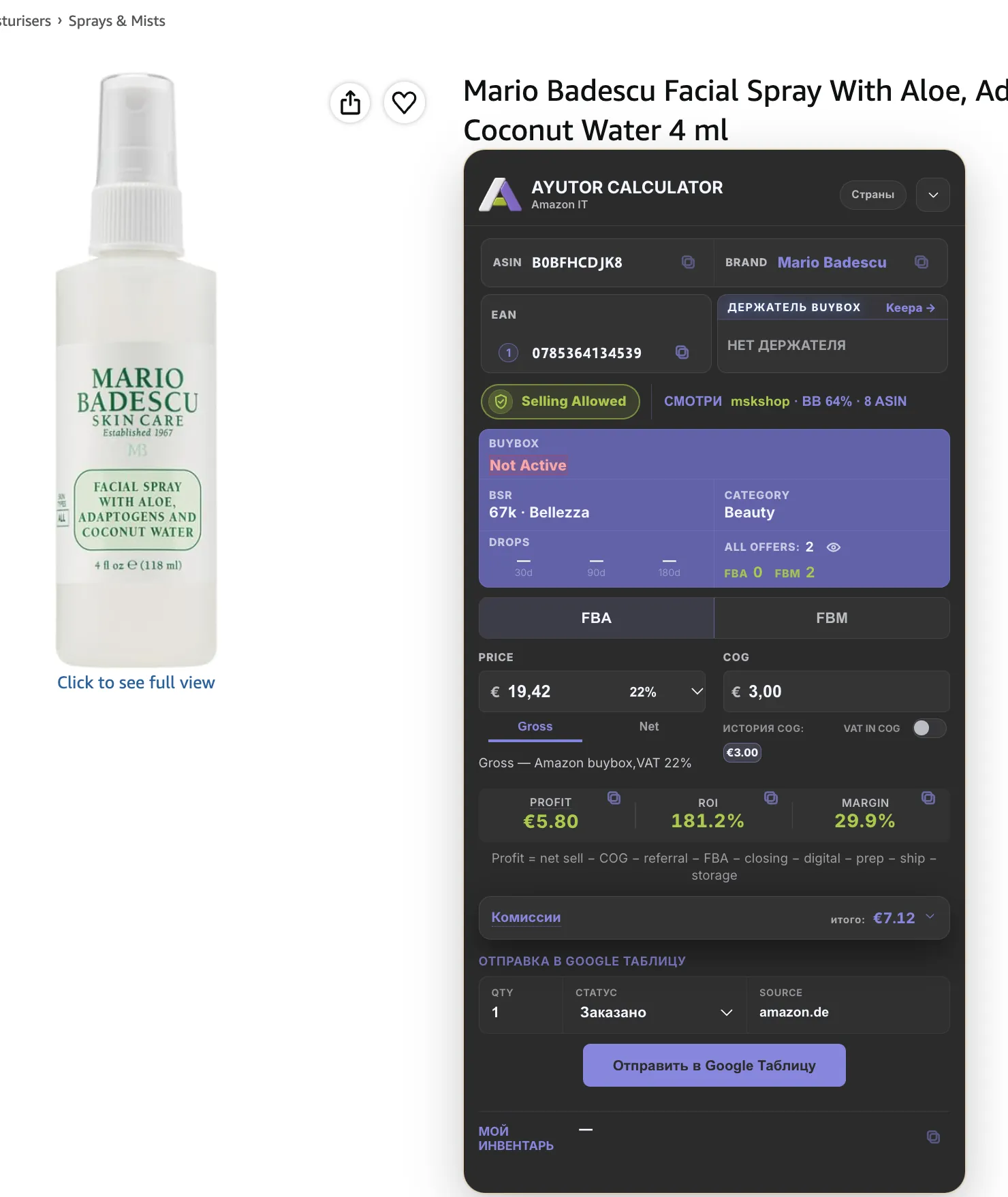
Ayutor Calculator extension on an Amazon product page: Selling Allowed, profit €5.80, ROI 181.2%, margin 29.9%.
  1. Can you sell it
  2. Profit, ROI and margin after fees
  3. One row into your Google Sheet
  • 9 Amazon EU marketplacesIT, DE, FR, ES, NL, BE, PL, SE, IE
  • Suppliers and Qogitawholesale buying and cart building
  • Chrome extensionworks on the Amazon listing
  • Read-only Amazon accessthrough the official API

Right now, buying runs on spreadsheets and memory

A price list in one tab, Amazon in another, the math in a spreadsheet, the result in a payout report. That is how most wholesale sellers work, and a mistake anywhere costs money.

  • Profit in your head

    Referral fee, FBA, shipping and VAT get added up by hand. Miss one line and the product sells at a loss.

  • Restrictions after payment

    You learn the brand is closed to you when the batch is already paid for and on its way.

  • Carts built by hand

    Hundreds of supplier items, each checked against price, ROI and stock.

  • Results from the payout report

    Without your own unit cost per product, profit and turnover look the same.

Ayutor Calculator

See a product's profit right on the Amazon listing, before you order.

Install the extension and open a product page. A panel appears on the right: Buy Box price, category rank, how many sellers, and whether Amazon lets you sell it. Enter your purchase price and the panel shows profit per unit after every fee, plus ROI and margin, for FBA and FBM separately. The extension is included in the subscription.

  1. Can you sell it

    The lock shows your status before you order: Selling Allowed, Approval Required, Restricted. A Hazmat badge marks dangerous goods.

  2. Price and cost

    Gross or Net price, with the marketplace VAT rate next to it. COG is what one unit costs you.

  3. Profit, ROI, margin

    Net price minus your cost, Amazon referral fee, FBA, prep, shipping and storage. ROI is the profit each euro you spend brings back, in percent.

  4. Sheet and stock

    Quantity, status and source go as one row into your Google Sheet. Below it, your FBA and inbound stock.

Install the extension
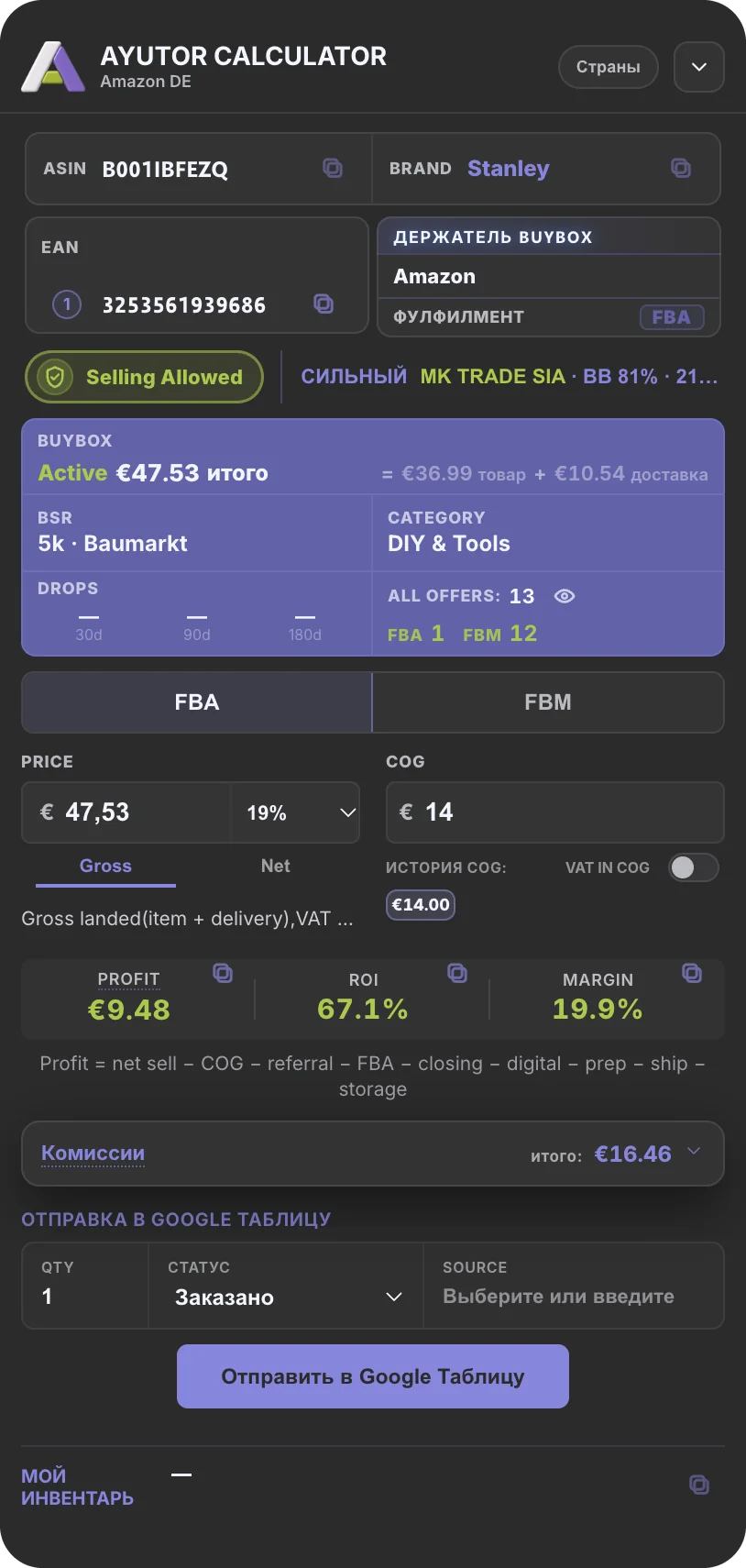
Ayutor Calculator panel on Amazon DE: Selling Allowed, price €47.53, cost €14, profit €9.48, ROI 67.1%, margin 19.9%.

Marketboard

What you earned in any period, from your own unit costs.

Pick a period: today, yesterday, this month or your own dates. Sync sales pulls in Amazon orders and finances through the API, read-only, and the tiles show sales, orders, refunds, payout and net profit. You set the unit cost (COGS) for each product yourself, so profit is counted from what you paid, not from turnover.

Example data. Screen redrawn in the shared Ayutor style.

  1. Periods side by side

    Today, yesterday, month to date and last month in one row, plus custom dates.

  2. Sync sales

    Pulls in fresh sales and Amazon fees.

  3. Product cost

    COGS per product. Without it profit is incomplete, and Alerts will remind you.

  4. Amazon reimbursements

    Money Amazon owes you for lost, damaged or underpaid items, in one list.

Qogita Bot

Builds a Qogita cart by your thresholds and gives you a file: what to buy from which supplier, and how many.

Today Qogita Bot runs in Telegram, for Amazon IT, DE, FR and ES. You set your thresholds once, the bot selects products, drops weak and restricted items and builds the Qogita cart. You get an Excel priority file: which suppliers close their minimum order, which products to take, how many units and at what profit. You place and pay for the order in Qogita yourself.

How it works today, in Telegram

  1. 1
    Thresholds

    Marketplace (IT, DE, FR or ES), minimum ROI and profit, accepted selling restrictions, Hazmat mode (NORMAL, HAZMAT, MIX), minimum supplier stock.

  2. 2
    Build

    The bot selects products by your thresholds and builds the Qogita cart around suppliers' minimum orders.

  3. 3
    Priority file

    An Excel file by supplier: where to close the order, which products and how many units, cart price and profit.

  4. 4
    Order

    You check the file and place the order in Qogita.

Coming to your accountThis is how cart building will look in your Ayutor account.

Example data. MOV is the supplier's minimum order value.

Analyzer

A supplier price list in one grid.

A list opens as a table: cost, ROI, stock and selling restriction in one row, with a filter on every column. Click a product to open its card with 30, 90 and 365-day history and an FBA and FBM calculator. Compare puts two lists side by side.

CRM

Suppliers, tasks and the buyer's day.

The work day shows what is urgent today. Supplier review is a queue of cards with three decisions: Buy, Analyse, Skip. Next to it sits the catalogue: suppliers, brands, orders, contacts and documents. Connect Gmail and an email can become a task.

Example data.

For your first batch and for your team

If you are starting out

The two big risks for a new seller: buying at a loss, or buying a brand you cannot sell. The calculator answers both on the listing before you order, and Marketboard gets you counting profit from unit cost from the first month.

  1. Ayutor Calculator
  2. Marketboard

If you have volume and a team

Your buyer reviews suppliers in CRM, checks price lists in Analyzer and builds the cart with Qogita Bot by shared thresholds. The money side lives in Marketboard instead of a dozen spreadsheets.

  1. CRM
  2. Analyzer
  3. Qogita Bot
  4. Marketboard

How we calculate

Profit=net price−cost−Amazon referral fee−FBA−variable closing fee−prep−shipping−storage

Example from the panel: price €47.53, profit €9.48, ROI 67.1%, margin 19.9% (Stanley, Amazon DE).

The panel in the extension uses the same formula. Every fee opens up separately, so any number can be checked by hand.

Data and access

Amazon access is read-only, through the official API. Ayutor sees orders, finances and stock, and changes nothing in your account. The extension reads the Amazon page you have open. Email in CRM connects read-only.

Example review
“I stopped adding up fees in a spreadsheet. I see profit on the listing and whether Amazon lets me sell it.”
First Last, seller, Amazon IT
Example review
“Unit cost per product finally showed which items were breaking even.”
First Last, seller with a team, Amazon DE

One subscription for all five tools

No tiers and no paid add-ons. Everything on this page is in one price.

Pricing details
Ayutor

€100per month excl. VAT

First 14 days freeTry 14 days free
  • No card needed to start
  • Cancel anytime in your account
  • The extension is included
  • Ayutor Calculator
  • Marketboard
  • Qogita Bot
  • Analyzer
  • CRM

FAQ

What happens after 14 days?

You decide whether to continue at €100 per month excl. VAT. No card needed to start.

How do I cancel?

Yourself, in your account, anytime.

Which marketplaces?

Extension: Amazon IT, DE, FR, ES, NL, BE, PL, SE and IE. Qogita Bot: IT, DE, FR and ES.

Is the extension included?

Yes. Ayutor Calculator runs in Chrome and is part of the €100. The other tools open in the browser.

How does Qogita Bot work?

Today in Telegram, for Amazon IT, DE, FR and ES: you set thresholds, the bot builds the Qogita cart and gives you an Excel priority file by supplier. You place the order in Qogita. The bot moves into your Ayutor account later.

What can Ayutor do in my Amazon account?

Only read data through the official API: orders, finances, stock. It cannot change anything in your account.

Try Ayutor on your own products

14 days free, all five tools. Then €100 per month excl. VAT, cancel anytime.